Baby Games for 2-5 Year Olds
- 4.6
- Rating
- 1.00M
- Installs
- Free
- Price

 Analysis by App-foxy
When I tested Baby Games for 2-5 Year Olds, I approached it less like a conventional game and more like a small activity box for a shared family device. That distinction matters. A toddler may tap it for a few minutes while a parent prepares breakfast, while an older preschooler may use the same collection with more patience and curiosity. The app is made by Timpy Games For Kids, Toddlers & Baby, and its focus is educational play for very young children rather than competition, complex rules, or long sessions.
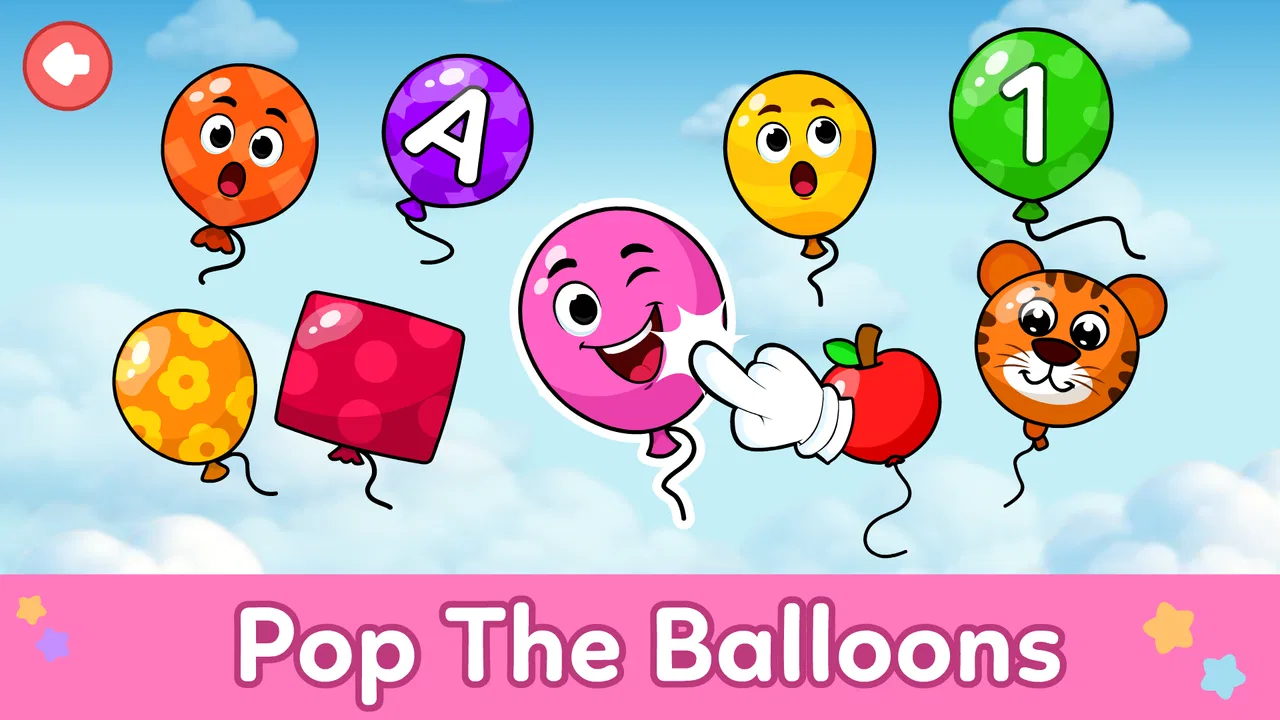
My first impression was that the app is trying to solve a practical household problem: giving little children something simple to explore without asking them to read instructions or understand a complicated menu. It combines more than one kind of activity, including balloon-popping play and other learning games, so it can work as a quick distraction or as a short parent-guided activity. I would recommend it most to families who want an easy starting point for early digital play, not to parents looking for a complete preschool curriculum.
How it works in a real shared-device household
The most useful way to judge this game is to imagine a normal day rather than an idealized learning session. A child might be sitting beside a parent during a grocery-list check, waiting for a sibling at an appointment, or having a quiet moment before dinner. In those situations, a game that can be opened quickly and understood through touch has a clear advantage. A young child does not need to remember a complicated sequence before beginning.
You May Also Like

 Blood Strike: 2.5 Anniversary
Blood Strike’s Loadouts Turn Every Drop Into a Tactical Gamble
A close look at Blood Strike’s custom loadouts: how fast access to signature weapons reshapes its battle royale rhythm, rewards preparation, and narrows the gap between fights.

 Pandora - Music & Podcasts
Pandora’s Music Is Easy to Start, but Harder to Recover
Pandora’s strength is its low-effort path from a seed to a station. Its weak spot is how much confidence it asks you to place in connection, setup, and quiet recovery.

 8 Ball Pool
 Is Built on Rivalries, Rematches, and Routine
A close look at the rivalries, rematches, shared routines, and unanswered safety questions that turn a quick pool match into a persistent mobile community.

 Samsung Music
’s Quiet Strength Is Playing What You Already Own
Its reach comes less from spectacle than from dependable access to a personal library. That simplicity is both the app’s strongest retention engine and its ceiling.

 AccuWeather: Weather Radar
AccuWeather Review: A Quick, Clear Forecast for Everyday Decisions
For everyday plans, the best forecast is the one you can understand quickly. AccuWeather makes rain timing, radar, and local conditions easy to act on, with a few trade-offs.

 Hill Climb Racing
Why Hill Climb Racing Still Turns Crashes Into One More Run
A tiny car, a bumpy hill and one more upgrade: Hill Climb Racing keeps resurfacing because its simple chaos makes every near-miss feel personal.
More From Our News Desk



I found the short-activity format better suited to these moments than a large educational platform that expects a child to follow a lesson path. With Baby Games for 2-5 Year Olds, the adult can offer a small task, watch for signs of tiredness, and stop without feeling that a lesson has been interrupted halfway through. That makes it practical on a phone or tablet that several people use during the day.
There is also a useful difference between shared use and independent use. A two-year-old may simply enjoy the immediate response from tapping and popping, while a child closer to five may benefit more when an adult names colors, objects, sounds, or actions during play. The app can therefore become more educational through conversation. I would not leave a very young child alone with it and assume that every tap is producing meaningful learning; the adult’s comments often provide the deeper value.
A realistic routine would be to let a child choose one activity after breakfast, play for a short period, and then put the device away before moving on to another task. If the same device belongs to an older sibling as well, I would agree in advance that the child gets one turn and the sibling gets the next. The game itself does not replace household rules. It simply makes the handoff easier because the activities are approachable and do not depend on a complicated personal profile.
That shared-device angle is one of the app’s strengths, but it also creates a limitation. A parent may need to stay close enough to prevent accidental taps outside the game, especially when a small child is still learning how to hold a phone. I would use it in a common room rather than treating it as a fully independent babysitter. The simpler the device arrangement, the smoother the experience tends to be.
What the different ages may get from it
The age range is broad enough that expectations should be adjusted. For a child around two, the main benefit is cause and effect: touch something, see what happens, and repeat the action. At that stage, success is not necessarily about answering correctly. It may be about developing attention, controlled tapping, and the confidence to explore a digital interface.
For a three-year-old, I would use the activities as prompts for language. Instead of silently watching, I might ask the child to describe what appeared, identify a color, or explain what they think will happen next. This turns a passive screen moment into a small conversation. The app supplies the visual trigger, but the adult supplies the questions and encouragement.
A four- or five-year-old may want more choice and may become frustrated if every activity feels equally easy. That is where the collection can be useful for variety but less convincing as a long-term challenge. The child can move between different types of play, yet a parent should notice whether the child is still learning or merely repeating familiar taps. If the goal is sustained problem-solving, a more structured preschool app may be a better companion.
I would also avoid assuming that the upper end of the age range means the game is designed for formal school preparation. Its tone and simplicity are better matched to early exploration. It can support basic recognition and interaction, but I would not use it as the only tool for letters, numbers, language development, or school readiness.
Setting boundaries before handing over the device
The setup is simple enough that the real preparation happens outside the app. Before giving it to a child, I would lower the device volume to a comfortable level, close unrelated apps, and make sure the battery is adequate. These are small steps, but they prevent the common problem of a child leaving the activity because a notification, call, or low-battery warning interrupts the session.
I would also decide whether the child is using a phone or a tablet. A tablet gives small hands more room to tap accurately, while a phone is convenient for travel and short waiting periods. The larger screen is not automatically better if the child is holding it too close, so I would keep the device on a stable surface whenever possible and remain nearby.
The game is free to download, but in-app purchases range from $2.99 to $4.99 per item. That is important in a shared household because a child may not understand that a tap can begin a purchase flow. I would handle any purchase decisions myself and explain to older children that not every button on a screen is part of the game. The safest practical habit is simple: the adult opens the activity and remains responsible for anything that leads beyond ordinary play.
I would not create a separate child account just for this app unless the family already uses one for the device. Instead, I would treat the game as a shared activity and keep the adult in charge of the device’s purchase and access boundaries. That approach avoids pretending that a single game can manage the wider digital environment. The important boundary is who holds the device, who starts the session, and who decides when it ends.
Another useful setup choice is to remove pressure from the session. I would not promise a child that the game will always be available, and I would not use it as a reward for every ordinary task. If it becomes the only reliable way to calm down, ending play may become unnecessarily difficult. Short, predictable turns work better than unlimited access, particularly for children who are still learning transitions.
Using it as a conversation tool instead of background noise
The strongest educational results come when the adult coordinates the experience. I would sit beside a younger child for the first few sessions and observe what attracts attention. Does the child tap rapidly, wait for a response, or lose interest when an activity changes? Those observations tell me more than simply seeing that the child can operate the screen.
A helpful technique is to narrate without taking over. I might say, “You found it,” or “What do you think will happen if you tap there?” Then I would pause. The pause matters because it gives the child time to respond rather than turning the activity into a demonstration by the adult. If the child is only two, the response may be a gesture or a sound, and that is still part of the interaction.
For siblings sharing one device, I would coordinate turns with a clear verbal routine. One child chooses the activity, the other watches, and then they switch. This can turn a potential argument into practice with waiting and observing. It is not a formal cooperative game, so I would not expect the app to manage sibling roles automatically. The cooperation comes from the household routine around it.
There is a subtle advantage to not treating every activity as a test. If a child makes a random choice, I would ask what they noticed rather than immediately correcting them. Balloon-popping play, for example, naturally encourages quick reactions, while a recognition activity may benefit from slower looking. The adult can change the pace by asking the child to wait, compare, or explain. That flexibility is more valuable than pushing for speed.
One of my practical tips is to use the app after an active period, not as the first response to boredom every time. A child who has just been running around may need a quiet transition, while a child who is already tired may become irritable with any screen. The same activity can feel calming in one context and overstimulating in another. Parents should judge the child’s mood rather than relying on the label “educational.”
I would also stop when the child begins tapping without looking, asking for the same thing repeatedly, or becoming upset when a turn ends. Those are signs that the session has stopped being useful. The app is well suited to brief bursts, but its value declines when it is stretched into a long, unplanned block.
Trust, age suitability, and the limits of the label
The game has an Everyone content rating, which fits its intended audience of very young children, but an age label should not be confused with a complete judgment about a particular child. Children develop at different speeds. Some toddlers will understand the interaction quickly, while others may need an adult to show them where to tap. Some preschoolers will enjoy the simplicity, while others will ask for more demanding challenges.
Because the app presents itself as educational, parents may reasonably wonder whether it can stand in for hands-on play. In my view, it cannot, and it should not be asked to. Blocks, picture books, drawing, sorting household objects, and talking with an adult offer experiences a screen cannot reproduce. The game works best as one small option in that mix.
I also would not use it to measure ability. A child who struggles with a touch activity may simply have difficulty with the device, not with the underlying concept. Likewise, a child who succeeds quickly may be enjoying pattern repetition rather than demonstrating broad understanding. The right question is whether the app encourages curiosity and interaction, not whether it produces a score worth comparing.
The developer’s specialization in games for kids, toddlers, and babies gives the product a clear audience, and the app has reached over one million installs with an average rating of 4.6 from around eight thousand ratings. Those figures suggest that many families find the concept useful, but they do not tell me whether it will match a specific child’s temperament. I would still watch the first session personally rather than relying on popularity as a guarantee.
The release date was October 18, 2022, and the current version is 1.8.1. It supports devices running Android 5.1 or later, so compatibility is broad for families using older Android hardware. That can be helpful when a household keeps an older tablet for children instead of handing over a primary phone. At the same time, older devices may feel slower or have smaller screens, so the quality of the experience will depend partly on the hardware.
Where it beats ordinary alternatives, and where it does not
Compared with a single-purpose balloon-popping game, this app offers more variety and a clearer educational purpose. A child who tires of one quick reaction activity can move to another type of learning play without leaving the same collection. That makes it more practical for a parent who wants one familiar place to start.
Compared with a video platform, the child is doing something rather than simply watching. Tapping and choosing can encourage participation, and the adult has more opportunities to ask questions. However, the app is not automatically better than video in every situation. A carefully chosen story can support language and imagination in ways a collection of touch activities may not.
Compared with subscription-based preschool programs, the free entry point is appealing. Families can try the basic experience without committing to a recurring service. The trade-off is that a more comprehensive learning platform may offer clearer progression, stronger parent reporting, or lessons organized around specific skills. I would choose this game for casual practice and variety, not for a carefully tracked learning plan.
Compared with physical toys, the app is easier to carry and can occupy a child during a short wait. Physical play remains better for movement, fine-motor variety, and open-ended creativity. The digital activity is more contained, which is useful in a car or waiting room but less valuable if the child has room and time to play with real objects.
One non-obvious trade-off is that variety can hide repetition. A child may believe they are exploring many activities while using the same basic touch pattern again and again. I would occasionally ask the child to explain what they are doing or connect it to something in the real world. If that conversation never develops, I would switch to a book, puzzle, or hands-on activity rather than extending the session.
Who should use it and who should skip it
I think Baby Games for 2-5 Year Olds is a good fit for a parent who wants a free, approachable collection for short supervised sessions. It is especially suitable for a family with a shared Android tablet, a toddler who enjoys immediate visual responses, or a preschooler who benefits from gentle repetition and adult conversation.
It is also a sensible choice for travel preparation. I would open it at home first, learn which activities the child prefers, and then use it during a short wait rather than introducing it for the first time in a stressful public place. That small bit of preparation makes it easier to manage expectations and avoid handing over the device while already rushed.
I would skip it if your main goal is advanced preschool instruction, detailed progress tracking, or independent use without adult oversight. I would also look elsewhere if your child becomes frustrated by simple activities or needs a strong narrative, construction system, or escalating challenge. The game’s accessibility is its appeal, but accessibility can feel shallow to an older or particularly curious preschooler.
Families who are very strict about screen routines may still use it successfully, provided they decide the time and purpose beforehand. The app does not need to become a daily habit to be useful. In fact, keeping it occasional can preserve its value as a calm, familiar option rather than allowing it to dominate the child’s free time.
My household verdict
After considering how it fits into real family routines, I see this game as a convenient activity collection rather than a digital replacement for early childhood play. Its simple touch-based approach makes it approachable for toddlers, while the range of activities gives preschoolers some choice. The best sessions are short, supervised, and connected to conversation.
I appreciate that the free price makes trying it straightforward, although the individual in-app purchases mean an adult should handle the device whenever a child is exploring menus. The Everyone rating and broad Android support make it easy to consider for a family device, but they do not remove the need for sensible household boundaries.
My final recommendation is positive with realistic expectations. If you want a portable way to introduce a young child to simple educational screen activities, I think it is worth trying. Use it as a bridge between waiting, talking, and playing—not as a substitute for books, movement, creative toys, or time with a parent. The most valuable feature is not the tapping itself, but the conversation and coordination you build around it.
For my own household-style routine, I would keep the device in a shared room, let the child choose one activity, stay close during the session, and end while the child is still engaged rather than already frustrated. That approach brings out the app’s genuine strengths and keeps its limitations in proportion. Baby Games for 2-5 Year Olds is best when it remains one small, manageable part of a child’s day.
FAQs for Baby Games for 2-5 Year Olds
01What age group is 'Baby Games for 2-5 Year Olds' suitable for?
This app is specifically designed for children aged 2 to 5 years old. The games are crafted to cater to the developmental stages of toddlers and preschoolers, focusing on enhancing cognitive abilities, motor skills, and creativity. Each activity is easy to follow, ensuring a fun and educational experience for young children.
02Are there any in-app purchases or ads in 'Baby Games for 2-5 Year Olds'?
Yes, while the app offers a range of free games, there are also optional in-app purchases available to unlock additional content. Additionally, the app may display ads, but these are typically child-friendly and minimal, ensuring a safe environment for kids while playing.
03Can 'Baby Games for 2-5 Year Olds' be played offline?
Yes, once the app is downloaded, most games within 'Baby Games for 2-5 Year Olds' can be played offline. This feature makes it convenient for parents to entertain their children during travel or in situations where internet access is limited.
04What educational benefits does 'Baby Games for 2-5 Year Olds' offer?
The app provides numerous educational benefits by incorporating elements that promote learning through play. It helps develop fine motor skills, hand-eye coordination, color and shape recognition, and basic problem-solving abilities. Each game is designed to encourage curiosity and foster a love for learning in young children.
05Is parental supervision required while using 'Baby Games for 2-5 Year Olds'?
While the app is designed to be child-friendly and intuitive, parental supervision is recommended, especially for younger children. This ensures that children navigate the app safely and parents can help guide the learning experience, enhancing the educational value of the activities provided.
Pros
- Engaging educational activities for kids.
- Bright and colorful graphics attract children.
- User-friendly interface for easy navigation.
- Offline mode available for uninterrupted play.
- Regular updates with new games and features.
Cons
- Limited free content; many features require payment.
- Some games may not challenge older kids.
- Advertisements can interrupt the playing experience.
- Requires significant storage space on devices.
- In-app purchases can add up quickly.

Baby Games for 2-5 Year Olds
Gallery